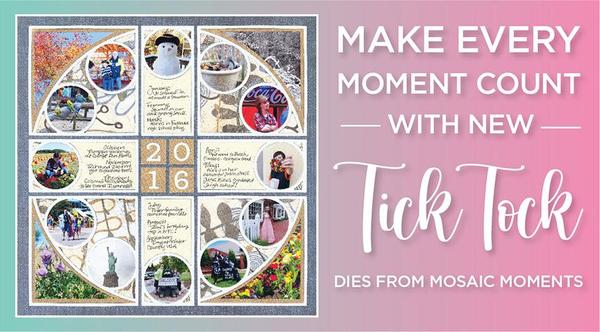
You know how sometimes you look back and think, “Wow, this year has flown by!” That’s exactly the feeling that inspired my new Tick Tock Dies — a design that captures the beautiful rhythm of life’s moments, one snapshot at a time.
The Tick Tock set has such a fun circular flow — it feels like time in motion! You can highlight a single event, show how your family changed through the seasons, or create a year-in-review.
Our amazing design team took this idea and ran with it — you’ll see pages filled with family adventures, beach days, and travels that circle perfectly around the moments that matter most. Their creativity completely blew me away, and I can’t wait for you to see what’s possible with this set.
So go ahead — make every moment count. You’ll love how easy it is to create pages that feel timeless.
Have a you're-worth-it week!
Tami Potter
Layout Above Features: 12x12 Denim Grid Paper from the Weekend Collection, NEW Tick Tock Die, Layering Die Bundle Colored A-L through E-L, and the Basic Die Bundle
A-E & 1" Grid - Colored. Pattern paper from Basic Grey™.
Get ready to fall in love with the brand-new Tick Tock
Die!
This die is perfect for adding movement, balance, and a touch of whimsy to your layouts. It creates a large circle that stretches across your grid, with smaller circular spots tucked toward the outer edge of the design. Each curve and circle gives you a chance
to showcase a favorite memory, highlight a little detail, or add a pop of pattern that keeps your page lively and full of motion.
If you’ve been looking for a fresh way to capture a full year of memories, the Tick Tock die is made for Year
in Review pages. The big circular design naturally draws the eye around your layout—just like time moving through the seasons—so it’s a wonderful way to tell the story of your year.
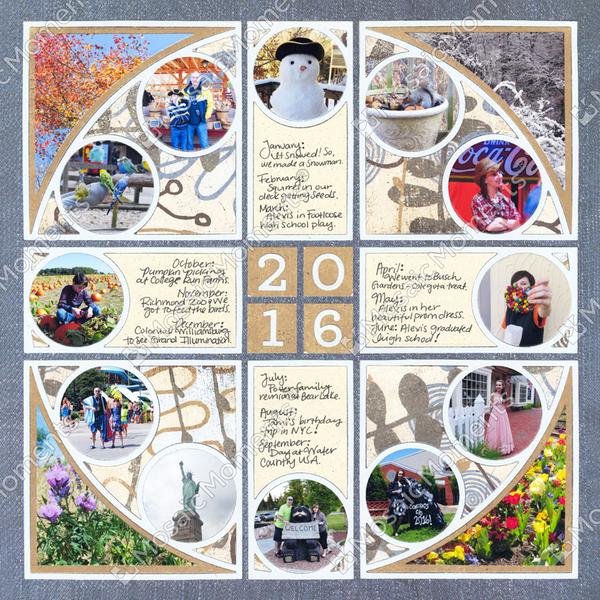
Take a cue from Paije’s beautiful “The Year 2016” layout. She used the Tick Tock dies in
each quadrant so the four sections come together to form one large, eye-catching circle in the center of her page. The smaller outer circles hold close-ups and sweet details—like the snowman in January and the bright flowers in spring—while the larger curved sections show the bigger moments from each season. You can immediately feel the rhythm of the year as your eyes travel around the circle.
To make your own Tick Tock page shine, try these ideas: • Crop for the curve. Place your subjects near the outer edge of the small circles so they fit beautifully within the frame. • Mix big and small moments. Use the large arcs for scenic shots and the smaller circles for close-ups or details. • Add contrast. Light mats under dark photos (or vice versa) make each little window stand out. • Layer it up. Slip a patterned paper behind the die for texture and extra charm. • Anchor your story. Add your year, month labels, or journaling blocks in the center to balance all that lovely circular motion.
You’ll love how easy it is to get a professional, dynamic look with this die. The Tick Tock practically designs the page for you—and it’s just as beginner-friendly as it is fun for experienced creators. Whether you’re wrapping up a year of family adventures or highlighting one special season, this die makes it simple to fit your story
together beautifully, piece by piece, like the perfect clockwork of memories.
So go ahead—grab your Tick Tock Die, pull out those favorite photos, and make every moment count!
Layout Above Features:12x12 Denim Grid Paper from the Weekend Collection. Pattern paper from Basic Grey™.
"Beautiful Destinations 2024" by Jodi Benson - Pattern #368
Dies needed to create this look:
NEW Tick Tock
Layering Die Bundle Colored A-L through E-L
Basic Die Bundle A-E & 1" Grid - Colored
You can take the Tick Tock dies in so many creative directions—they’re not just fun to look at, they’re a dream to design with.
Each curved section of the die fits together like a puzzle, forming that big, bold circular
design that instantly makes your page feel polished. The smaller circles toward the outside are perfect for close-up shots, while the larger arcs can hold scenic photos, patterns, or journaling. You can even use the Tick Tock as a framework for themed layouts that tell a story through the year.
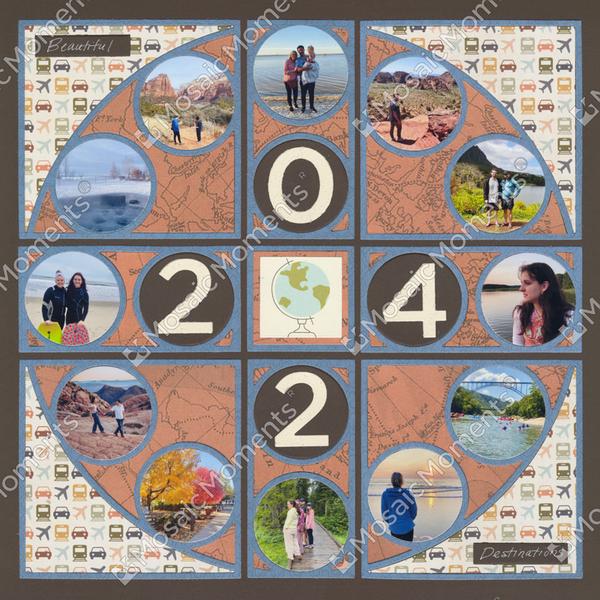
Make your “Year in Review” pages more personal by choosing a specific theme—like travel destinations, family milestones, or monthly favorites. For example, in the “Beautiful Destinations 2024” layout by Jodi, she used the Tick Tock dies to create a globe-like design that perfectly fit her travel story. She added a second (inner) set of circles
inside the larger design to feature the date “2024” in big, bold numbers at the center. Around the outer ring, she placed photos from her adventures throughout the year—each destination captured in one of the smaller circles, forming a beautiful visual journey around the page.
You
can use that same idea for your own travels or yearly highlights! Try filling the outer ring of circles with photos that represent each place or memory, then use the center space to display a title, a favorite quote, or your year. It’s a wonderful way to document how far you’ve gone—both literally and creatively.
With the Tick Tock dies, every circle has a purpose, every curve connects your story, and every layout feels full of life. Whether you fill it with travel adventures, family traditions, or simple everyday joys, this die helps you capture the rhythm of your year in the most eye-catching way. So pull out those photos and get ready to make your next “Year in Review” layout shine—it’s your time to make
something unforgettable!
Layout Above Features:12x12 Cocoa
Grid Paper. Pattern paper from Simple Stories™.
🏖️ It's Always Beach Time – Double the Circles,
Double the Fun!
"Always Beach Time" by Paije Potter - Pattern #368
Dies needed to create this look:
NEW Tick Tock
The Tick Tock dies aren’t just for year-in-review pages—they’re perfect for any theme, especially when you want to pack in lots of photos or creative details.
You can build your design two different ways: create a layout with 12 single circles to highlight one moment from each month or memory, or take it a step further by using the double circle die option. With the double circle setup, you can layer
circles, add even more photos, or tuck in journaling spots and embellishments for extra personality.
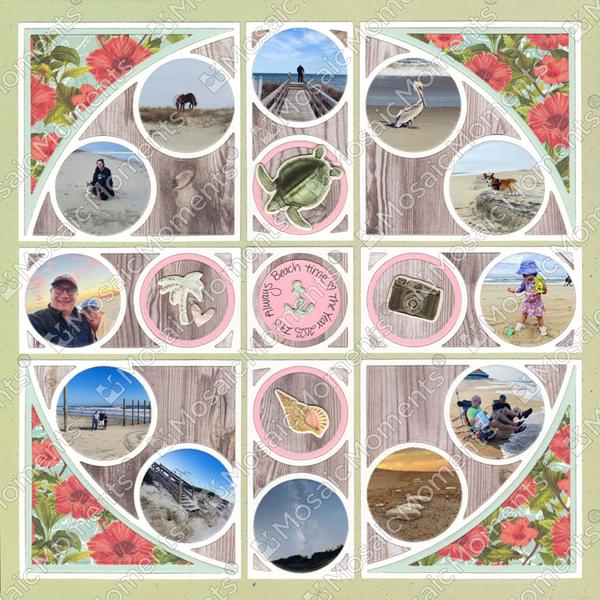
In Paije’s “Always Beach Time” layout, she used this double-circle option beautifully. Her beach photos fill the outer rings, giving you a sense of sun and sea all around the
page, while the center 2x2 circle section holds the title “Always Beach Time.” She added small beach stickers inside the inner circles for a playful touch that ties the whole design together. The layers of circles feel like ripples in the water—bright, light, and full of movement.
This idea works for any kind of story—family adventures, holidays, or your favorite seasonal moments. The key is to let those circles do the work for you! Fill each one with something that captures the feeling of your day: footprints in the sand, waves, seashells, or smiling faces. Add layers of patterned paper behind the circles for depth, or use tone-on-tone mats to keep the focus on your photos.
The Tick Tock dies make it easy to fit more memories on one page without it ever feeling crowded. So go ahead—mix and match circles, stack layers, and have fun creating a layout that keeps the good times rolling, just like the waves.
Layout Above Features:12x12 Beachgrass Grid Paper from the Nantucket Collection. Pattern paper from Craft Consortium™ & Simple Stories™, and stickers from Simple Stories™.
Share with a Friend
Did you enjoy this newsletter? Do you have a friend that you think will enjoy it to? Please share it with them.
We’ve got something NEW (and super handy) just for you…
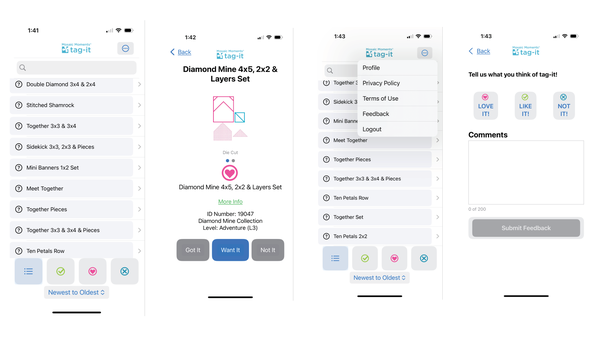
Introducing the Mosaic Moments Tag-It App — your new favorite sidekick for organizing all your Mosaic Moments dies!
No more wondering “Do
I already have this one?” while you're shopping... With Tag-It, you can:
Mark dies as Got It, Want It, or Not It
See die shapes, ID
numbers, and levels at a glance
Click “More Info” for layout ideas and inspiration
Filter and search your collection with ease
Leave feedback and help us make it even better!
It's like having your die stash in your pocket — organized, up-to-date, and ready to inspire your next layout.